
How to Remote Start a Toyota Avalon
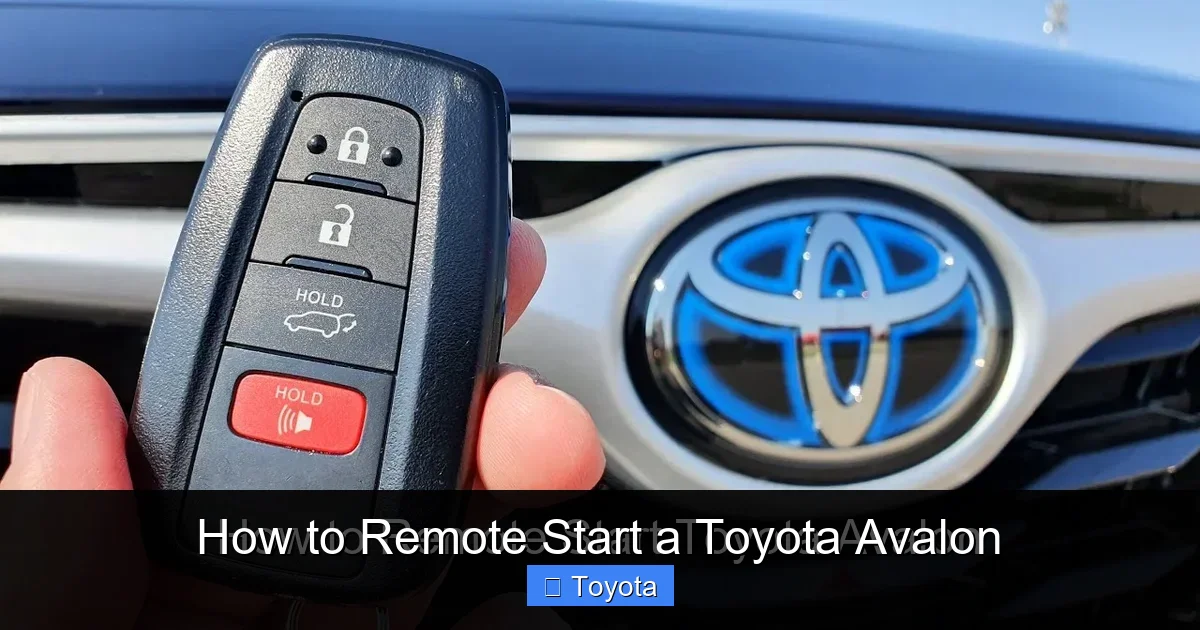
Remote starting your Toyota Avalon lets you warm up or cool down the cabin before you ever step inside. Simply press the lock button on your key fob, then hold the remote start button for a few seconds—watch for the parking lights to flash as confirmation. For added convenience, many models also support remote start through the Toyota app, giving you control from virtually anywhere.
Key Takeaways
- Verify compatibility: Confirm your Avalon model year and trim support remote start functionality.
- Use key fob sequence: Press lock twice, then hold lock for three seconds to activate.
- Leverage Toyota app: Newer models allow remote start via smartphone with active subscription.
- Engine runs ten minutes: Automatic shutdown occurs after one cycle; repeat to extend.
- Press brake to drive: Depress brake pedal and push start button before shifting gears.
- Climate resumes last settings: HVAC activates at previous temperature and fan speed automatically.
- Safety prevents unsafe starts: System disables if hood open, low fuel, or check engine light active.
📑 Table of Contents
- Getting Comfortable With Your Avalon’s Remote Start Feature
- The Standard Key Fob Sequence Step By Step
- Using The Toyota App For Remote Start
- Common Reasons Your Remote Start Fails
- Model Year Differences And Trim Levels
- Maximizing Comfort: Climate Control And Settings
- Remote Start Performance Data At A Glance
- Troubleshooting Tips And When To Visit The Dealer
- Wrapping Up: Enjoy The Convenience
Getting Comfortable With Your Avalon’s Remote Start Feature
There is something undeniably satisfying about walking toward your car on a freezing January morning and seeing the exhaust puffing gently, knowing the cabin is already toasty warm. Or maybe it is the middle of July, the asphalt is shimmering, and you hit a button on your key fob so the air conditioning has a fighting chance before you even open the door. If you drive a Toyota Avalon, you have this convenience right at your fingertips, but figuring out exactly how to use it can sometimes feel like decoding a secret message.
I remember the first time I tried to remote start a rental Avalon in a hotel parking lot. I pressed the lock button, then held the remote start button, and nothing happened. I stood there looking silly, pressing buttons in different combinations while the wind howled. It turns out, there is a specific sequence, and there are a few “gotchas” that the owner’s manual buries in fine print. Whether you have a brand new Limited trim or a slightly older model, the process is largely the same once you know the rhythm.
In this guide, we are going to walk through everything you need to know about how to remote start a Toyota Avalon. We will cover the standard key fob method, the smartphone app alternative, common reasons why it might fail, and a few pro tips to make the feature work better for your daily routine. By the end, you will be the person in the parking lot who gets it right on the first try every single time.
The Standard Key Fob Sequence Step By Step
The most common way to fire up your engine from a distance is using the physical key fob that came with your car. Toyota has kept this procedure consistent across many models, so if you have ever used the feature on a Camry or a RAV4, the muscle memory will transfer right over. If this is your first Toyota, do not worry; it is straightforward once you see it broken down.
Identifying The Correct Button
First things first: look at your key fob. You are looking for a button that usually has a circular arrow icon, often labeled “HOLD” or simply showing a curved arrow making a loop. On most Avalon fobs, this button sits near the bottom, separate from the lock, unlock, and panic buttons. Do not confuse it with the trunk release button, which often looks like an open hatch. The remote start icon is distinct because it implies a cycle or a timer.
The Three Press Method
Here is the exact sequence that works on most Avalon model years equipped with the factory remote start system:
- Press the Lock button once. The parking lights should flash once to confirm the car is locked and the security system is armed.
- Press the Lock button a second time. The lights will flash again.
- Press and hold the Lock button (or the dedicated Remote Start button with the circular arrow) for about three to five seconds.
If successful, the turn signals will flash multiple times (usually a slow blink followed by a rapid blink), and the engine will roar to life. The climate control system will default to the last setting you used when you drove the car last. If you left the heat on high, it comes on high. If you left the A/C on recirculate, it kicks in immediately.
What Happens After The Engine Starts
Once the engine is running via remote start, it will typically run for a preset duration—usually 10 minutes on most Avalon trims. After that time expires, the engine shuts off automatically to save fuel and prevent excessive idling. You can extend the run time by repeating the sequence while the engine is still running, which adds another 10 minutes to the clock. Just remember, you cannot drive the car until you physically enter the vehicle with the key fob and press the brake pedal while pushing the Engine Start/Stop button. This is a safety feature to prevent unauthorized driving.
Using The Toyota App For Remote Start
If you have a newer Avalon—generally 2019 and later with the Audio Multimedia system—you likely have access to Toyota’s Remote Connect services. This lets you start the car from your smartphone, which is incredibly handy if you are inside a building where the key fob signal cannot reach, like a high-rise office or a deep basement garage. It also lets you check the vehicle status, like fuel level or tire pressure, before you even walk out the door.
Setting Up Remote Connect
Before you can use the app, you need to activate the service. New vehicles usually come with a trial period (often three to ten years depending on the trim and model year). You will need to download the Toyota App (available on iOS and Android), create a Toyota Owner’s account, and link your Vehicle Identification Number (VIN). The app walks you through a verification process that usually involves sitting in the car with the ignition on to pair the vehicle to your account. It takes about five minutes and a decent cellular signal.
Starting The Engine From Your Phone
Once everything is linked, the process is beautifully simple:
- Open the Toyota App and log in.
- Tap the Remote Start icon on the main dashboard.
- Confirm the action (usually a slide-to-start or a PIN entry for security).
- Wait for the spinning animation to finish. The app will confirm “Engine Started.”
The app also lets you set the climate control temperature remotely on supported models, so you can tell the car “72 degrees” before you leave your desk. It is a game changer for extreme climates. If you are curious how this compares to other models in the lineup, the process is nearly identical to how to remote start a 2023 Toyota Camry, since they share the same multimedia architecture.
Subscription And Connectivity Notes
Keep in mind that Remote Connect relies on a cellular modem inside the car (usually AT&T or Verizon depending on the model year). If your Avalon is parked in a concrete bunker with zero bars, the app command will not reach the vehicle. The key fob uses a different radio frequency (usually 315 MHz or 433 MHz) that penetrates structures better, so always keep the fob as a backup. Also, after the free trial expires, Remote Connect requires a paid subscription. The key fob method, however, works forever with no monthly fee.
Common Reasons Your Remote Start Fails
Nothing is more frustrating than pressing the buttons, seeing the lights flash, but hearing… silence. Or worse, the lights flash a specific error pattern and the engine stays dead. The Avalon is smart; it has a long list of safety interlocks that prevent remote start if conditions are not perfect. Knowing these conditions saves you a trip to the dealer for a “broken” feature that is actually working exactly as designed.
The Safety Interlock Checklist
The system will not start the engine if any of the following are true:
- The hood is open. This prevents injury to a mechanic working on the engine.
- A door is ajar. Even slightly unlatched counts.
- The trunk/liftgate is open.
- The shift lever is not in Park. (Automatic transmission only, obviously).
- The brake pedal is depressed. (Someone might be sitting in the driver seat).
- The key fob is detected inside the cabin. This prevents accidental starts if you leave the fob in the cupholder.
- The check engine light is on. Many emissions-related codes disable remote start.
- Fuel level is critically low. Usually under 1-2 gallons remaining.
- The battery voltage is too low. The car protects the 12V battery from draining completely.
If you are troubleshooting, start with the easy stuff: close all doors firmly, check the hood latch, and make sure you have gas. If the check engine light is illuminated on the dash, that is your culprit. You can read more about general Toyota starting issues in our guide on what can cause a Toyota Corolla not to start; many of the electrical principles are shared across the lineup.
Decoding The Flash Patterns
When remote start fails, the parking lights often flash a specific code to tell you why. While the exact patterns vary slightly by model year, a general rule of thumb for Toyota is:
- One long flash: System armed/locked successfully (pre-start).
- Multiple rapid flashes: Engine started successfully.
- Two flashes, pause, two flashes: Often indicates a door/hood/trunk open.
- Three flashes: Often indicates brake pedal pressed or shift lever not in Park.
- No flashes, horn chirps: Usually means the key fob is inside the car or the system is in valet mode.
Consult your specific owner’s manual for the “Remote Start Error Codes” chart. It is usually near the back of the “Keys and Doors” section. Taking a photo of that page with your phone saves you from digging through the glove box in the rain later.
Model Year Differences And Trim Levels
Not every Avalon has remote start, and the way it works has evolved over the generations. If you bought your car used, you might not even realize you have it, or you might be trying to use a feature your specific trim lacks. Let us break down the generational split so you know what to expect.
Fourth Generation (2013–2018)
On these models, remote start was often a port-installed accessory or part of a specific premium package (like the Limited or Touring trims). It was not standard across the board. The key fob for these years typically has a dedicated round button with the circular arrow icon. If your fob only has Lock, Unlock, Trunk, and Panic, your car likely did not come with factory remote start. However, many dealers added aftermarket systems (like Toyota’s own VIP RS3200) which use a different button sequence—often Lock + Unlock simultaneously, or a long press on the trunk button. Check for a small toggle switch under the dash on the driver side; that is a telltale sign of an aftermarket install.
Fifth Generation (2019–Present)
Starting with the 2019 redesign, Toyota made Remote Connect standard on higher trims (XLE, Limited, Touring, TRD) and available via the app. The key fob sequence (Lock-Lock-Long Press Lock) became the universal standard. The base L trim and sometimes the XLE Hybrid (depending on the specific package) may not have the hardware enabled. You can verify by looking at your Toyota App features list or checking the window sticker (Monroney label) for “Remote Connect” or “Remote Engine Starter.” If you are shopping for a used one and longevity is a concern, you might want to read up on how many miles a Toyota Avalon can last to gauge the platform’s durability.
Hybrid Models Specifics
The Avalon Hybrid behaves a bit differently. When you remote start a hybrid, the gasoline engine does not always fire up immediately. The car enters “Ready Mode.” The climate control runs off the high-voltage battery and electric compressor. The gas engine will only kick on if the battery state of charge drops too low or if the heating demand is high enough to require engine coolant heat. This is perfectly normal. Do not panic if you hear silence but see the “Ready” light on the dash via the window; the system is working.
Maximizing Comfort: Climate Control And Settings
Remote start is not just about spinning the engine; it is about conditioning the cabin. The Avalon does a decent job of remembering your last settings, but there are ways to optimize the experience so you step into a perfectly tempered car every time.
Setting The Stage The Night Before
The car resumes the exact climate state it was in when you last turned it off. If you drove home in 60-degree weather with the vents on “Fresh Air” and fan speed 2, that is what you get at 6 AM when it is 15 degrees outside. The trick is to set your climate controls for the next morning before you shut the car off the night before. Crank the heat to “HI,” set the fan to “Auto” or a high manual speed, engage the heated seats and steering wheel (if equipped), and set the mode to “Recirculate” for faster heating. When you remote start the next day, it blasts exactly that.
Using The Defroster Effectively
On frosty mornings, you want the windshield clear. The Avalon’s auto climate logic is smart, but you can help it. Leave the defroster button (the icon with the windshield and wavy arrows) engaged when you park. When the car remote starts, it will prioritize the windshield vents. If you have the available windshield wiper de-icer (standard on Limited/Touring), that activates automatically based on outside temperature sensors when the engine runs. This little hack saves you five minutes of scraping.
Heated And Ventilated Seats Automation
On 2019+ models with the upgraded climate system, you can configure the heated seats and steering wheel to activate automatically during a remote start based on outside temperature. Go into the Multimedia Settings > Vehicle > Climate > Remote Start Climate Prep. You can set thresholds like “Heated Seats On if below 50°F” or “Ventilated Seats On if above 80°F.” It is a buried menu, but once set, it works like magic. This level of customization is similar to what you find in other flagship Toyotas, like the options detailed in our piece on how to use sport mode in a Toyota Camry—the menus share the same logic structure.
Remote Start Performance Data At A Glance
Sometimes it helps to see the numbers side by side. The table below summarizes the key operational parameters for the factory remote start system on the fifth-generation Avalon (2019+), which is the most common configuration owners ask about.
| Parameter | Specification | Notes |
|---|---|---|
| Key Fob Range | ~80 ft (25 m) | Line of sight; walls reduce range significantly |
| App Range | Unlimited (Cellular) | Requires active Remote Connect subscription & cell signal |
| Default Run Time | 10 Minutes | Extends another 10 min if sequence repeated while running |
| Max Total Run Time | 20 Minutes | After 20 min, must manually restart or drive car |
| Climate Resume | Last Used Settings | Set night before for best results |
| Auto Seat/Steering Heat | Configurable (2019+) | Via Multimedia Settings > Vehicle > Climate |
| Hybrid Engine Behavior | Ready Mode (EV) | Gas engine starts only if needed for heat/battery |
| Subscription Cost (Post-Trial) | ~$8/mo or $80/yr | Remote Connect only; Key fob remains free |
Troubleshooting Tips And When To Visit The Dealer
You have checked the doors, the hood is shut, you have half a tank of gas, and the check engine light is off. You press the buttons perfectly. The lights flash, but the engine does not crank. What now? Before you schedule a service appointment, there are a few deeper checks you can do yourself.
Check The 12V Battery Health
This is the number one cause of “intermittent” remote start failures on modern Toyotas. The Avalon’s computer monitors battery voltage aggressively. If the battery is marginal—say, four or five years old—it might have enough juice to start the car normally (when you are inside pressing the brake), but the voltage dip during the remote start crank sequence triggers a safety abort. The system sees the voltage drop below a threshold (usually around 9.5V during crank) and kills the process to protect the ECU. If your car starts fine with the push-button but fails remotely, load-test the 12V battery. Auto parts stores often do this for free.
Key Fob Battery Weakness
The remote start sequence requires three distinct transmissions from the fob in rapid succession. A weak coin cell (CR2032) might manage one or two, but the third “long press” transmission draws more current. If the fob battery is low, the car receives the first two lock signals but misses the start command. Replace the fob battery annually as cheap insurance. It costs two dollars and takes thirty seconds.
Valet Mode And Aftermarket Alarms
If you bought the car used, check for a valet switch. It is usually a small, unmarked toggle or push button hidden under the dash near the steering column or in the glove box. If this is flipped to “Valet,” it disables remote start (and often the alarm) while keeping keyless entry functional. Also, if a previous owner installed an aftermarket alarm/remote start, the factory system might be disabled entirely, or the two systems could be conflicting. Look for a non-Toyota antenna stuck to the windshield or an extra siren under the hood.
Software Updates
Toyota occasionally releases Technical Service Bulletins (TSBs) or software updates for the Body Control Module (BCM) or the Telematics Control Unit (TCU) that address remote start logic. If your car is under warranty, a dealer can check for updates in about 20 minutes. It is worth asking during your next oil change. Mention the specific symptom: “Remote start flashes lights but engine doesn’t start.” That helps the technician pull the right diagnostic tree.
Wrapping Up: Enjoy The Convenience
Mastering the remote start on your Toyota Avalon changes the daily grind in a small but meaningful way. It is not just a gadget; it is a quality-of-life upgrade that saves you from shivering in a cold seat or sticking to scorching leather. The key fob method (Lock, Lock, Hold) is your reliable, no-subscription workhorse. The Toyota App gives you unlimited range and climate pre-setting, provided you keep the subscription active and have a cell signal.
Remember the golden rule: set your climate controls the night before. The car has no psychic powers; it only knows what you told it last. If you treat the remote start as a “resume last session” button rather than a “make it perfect” button, you will never be disappointed. And if it ever acts up, run through the interlock checklist—hood, doors, trunk, park, brake, fob location, check engine light, fuel, battery—before you panic.
Whether you are driving a 2015 Limited with the accessory fob or a 2024 Hybrid Limited with the app on your Apple Watch, the fundamental joy is the same: you walk up to a car that is ready for you. Now get out there and enjoy that pre-warmed (or pre-cooled) cabin. You earned it.
Frequently Asked Questions
How do I remote start a Toyota Avalon using the key fob?
To remote start a Toyota Avalon with the key fob, press the lock button twice, then hold the remote start button (usually a circular arrow) until the vehicle lights flash. The engine will start and run for 10 to 15 minutes before automatically shutting off, provided all doors and the hood are closed and you’re within range.
Can I remote start a Toyota Avalon without a key fob?
Yes, you can remote start a Toyota Avalon without using the physical key fob by utilizing the Toyota connected app, which requires a subscription and cellular connectivity. After pairing your phone with the vehicle, you can start the engine from anywhere, view status, and even set scheduled starts for extreme weather preparation.
What should I do if my Toyota Avalon remote start is not working?
If your Toyota Avalon remote start is not working, first verify that the key fob battery is fresh and that all doors, the hood, and the trunk are fully closed and latched. The system is designed to prevent remote starts if any entry point is open or if the security system detects a fault, so checking the dashboard for warning lights can also help identify the issue.
Does the Toyota Avalon remote start work with the smartphone app?
The Toyota Avalon remote start feature does work with the Toyota smartphone app, enabling remote starts from miles away as long as you have an active data connection and an enrolled account. This app-based system often includes additional features like remote lock/unlock, vehicle finder, and maintenance reminders, making it a versatile alternative to the key fob.
How do I know if my Toyota Avalon has remote start capability?
To find out if your Toyota Avalon has remote start capability, check your key fob for a dedicated remote start button labeled with a circular arrow or the word “Start.” You can also confirm by looking at your vehicle’s original window sticker or navigating to the “Remote Connect” or “Security” menu in the infotainment system settings.
Can I remote start a Toyota Avalon from inside my house?
Yes, you can remote start a Toyota Avalon from inside your house, but the key fob’s effective range is typically around 80 feet, so you may need to step closer to the vehicle if you’re too far inside. The Toyota app removes this distance limitation, allowing you to start the engine from anywhere with cellular service, though always ensure the garage door is open for safety.


